Independent
·
2026
Amélie’s Book Club
(working title)
A tactile iOS library for collecting books and keeping a personal record of your reading.

Role
Product design & development
Timeline
2026
Team
Solo, with AI-assisted development
Platform
iOS / Library / Reading
Overview
A library that feels like a shelf of books
I began the app for my daughter, a prolific reader. I wanted to give her a place to remember the books she has read and see how much she reads over time, and it's becoming a personal library that any reader can make their own. Scan an ISBN or find a book by name, place it on your shelves, and record whether you're reading it, plan to read it or have finished it, and add your thoughts once you have. The design treats a collection as a place full of books rather than a list of records: cover artwork leads, books have visible depth and respond to touch, and the surrounding interface stays quiet. I designed the product and its interface, and built it as a native iOS app, pairing my own product and design decisions with AI coding tools for much of the implementation.
Tactile shelves
Covers, depth and page-count thickness that make a collection feel physical
Scan to shelf
Barcode, search and three catalogue sources in one flow
No pressure
A record of reading, never a streak to maintain
Challenge
A collection, not a list of records
Reading apps often flatten books into rows of metadata or push them into noisy social feeds. Neither feels like a real collection, and neither suits a young reader who simply wants to remember what she has read and see how much she reads. Getting a book in has its own problem: catalogues are incomplete and often return the wrong edition, so a scanner that fails quietly breaks the whole experience.
How could a digital library feel tactile, personal and alive, while keeping a record of reading that never turns into pressure?
Approach
Making books feel like books, from scan to shelf
Making books feel like books
I built the shelf around the physical qualities of books. Covers keep their individual proportions, page counts inform each book’s apparent thickness, and bindings, page edges and contact shadows give them depth. Books turn subtly as you browse and can be turned in the detail view. Four shelf densities, switched from the toolbar or with a pinch, change how much of the collection you see without changing how it’s organised.
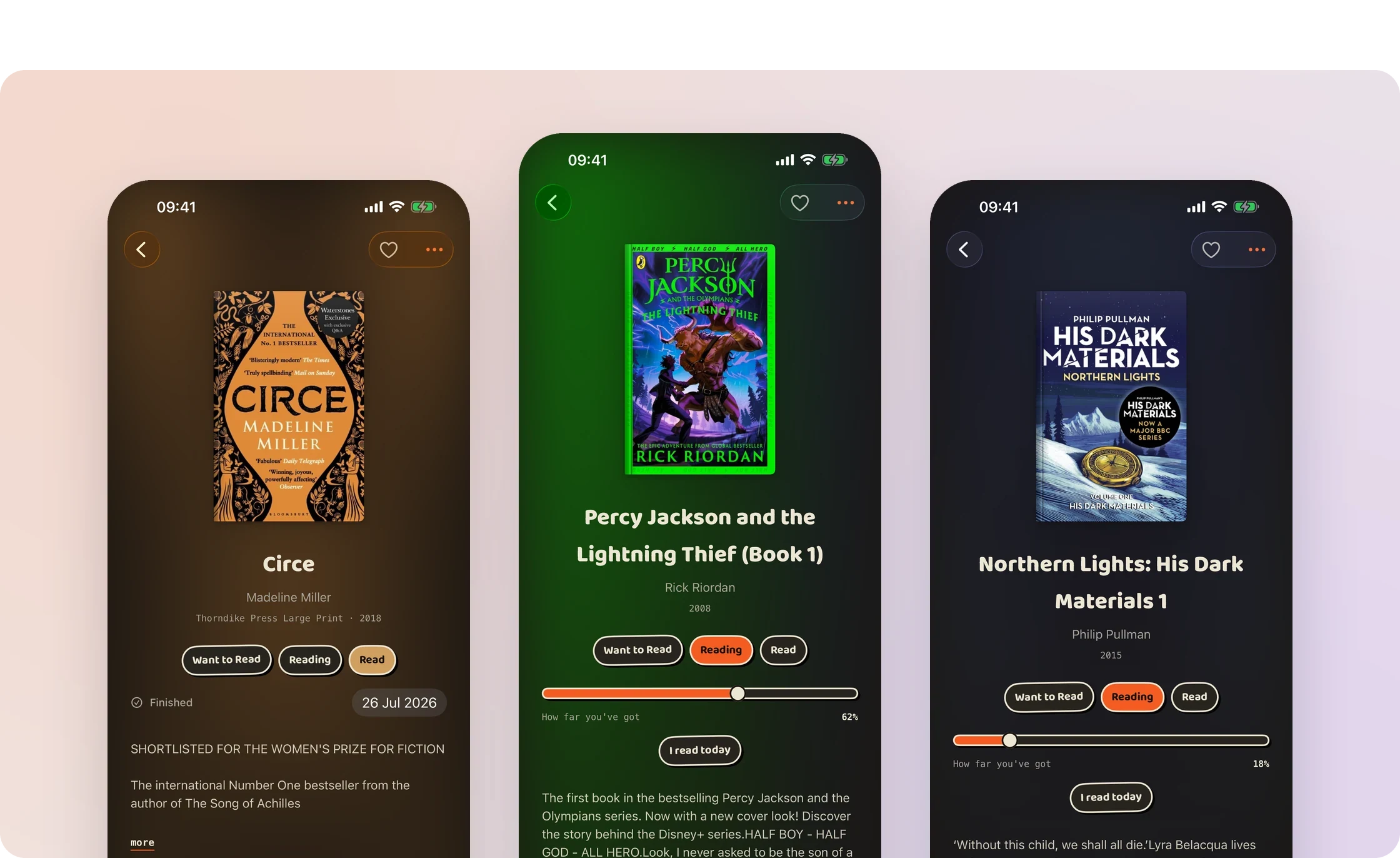
Detail screens for Circe, Percy Jackson and Northern Lights.
The detail screen borrows its colour from each cover, so the book itself sets the tone instead of every cover being wrapped in the same standard card.

Left Real cover proportions on the shelf, and a detail coloured by its cover. Right Three of the four shelf densities.
Getting a book onto the shelf
The scanning flow moves from barcode to identified book to reading state within one sheet, then returns to the camera so someone can add a stack of books in one session. Search offers another route: find a book by name across the connected catalogues when it isn’t to hand.
Because book catalogues vary in completeness and can return the wrong edition, the app combines multiple metadata sources, looks up scanned ISBNs, favours ISBN-specific covers, and provides a designed fallback when artwork is missing. A book is added locally first; deeper information and cover colour can arrive afterwards, so adding a book never waits on the service.

Left Find a book by name, then shelve it as Want to Read, Reading or Read. Right From an empty shelf to a library.
Responding to a real scanning gap
Testing the app with my daughter revealed that scanning wasn’t identifying all of her books. That exposed a gap in the barcode-to-catalogue experience, so I expanded the lookup to include Apple’s iTunes Search API as a third source alongside Open Library and Google Books, while keeping manual search available when a scan still can’t identify a book. The fix came from her actual shelf.
A personal record, without pressure
Watching my daughter use the early app shaped what came next. Currently Reading and Up Next organise the shelves, custom shelves let readers curate their own groupings, and a yearly grid shows what was read without turning reading into a goal or a streak. Finished books can take a rating, a short verdict and up to three reactions, so opinions have a place without becoming a review to write.

Left A book in progress, and shelves you curate. Right One menu for the library, and managing shelves.
A calm shelf and playful tools
The shelf stays warm and restrained so real cover art carries the colour, while reading figures, controls and reactions use a more playful language of saturated colour, strong outlines and rounded type. A compact design system keeps the two coherent, each with its own job.
Where the book-club idea goes next
The working title holds the next direction: sharing selected reading and responding to a book with lightweight signals, such as saying you loved it too. Comments and open forums are deliberately out of that design, so the social layer stays warm and personal rather than becoming another feed.
Build
Three catalogues behind one reliable scan
Amélie's Book Club is built in SwiftUI with SwiftData. VisionKit's DataScanner captures ISBNs, and a catalogue service queries Google Books, Open Library and the iTunes Search API, looking up scanned ISBNs, favouring edition-specific covers, ranking and de-duplicating results, and falling back to a designed cover when artwork is missing. Books are added locally first, with deeper details and cover colour arriving afterwards.
SwiftUI
SwiftData
VisionKit
Google Books
Open Library
iTunes Search
01
Physical, not flat
Page counts shape a book's thickness, and its cover sets the colour of its detail view.
02
Recover from a failed scan
Three catalogue sources, plus manual search when a barcode still can't be matched.
03
Record, not pressure
A yearly reading grid shows what happened, without streaks or goals.
Outcome
In use every week, and still growing
Amélie's Book Club is in development, and my daughter uses it every week to record the books she reads. That use keeps shaping it, from the third catalogue source to reading states, shelves and reactions. The foundations are in place: tactile shelves, a scan-to-shelf flow that recovers when catalogues fall short, and a personal reading record. Next is the book-club layer itself.
Tactile shelves
Book objects with real proportions, depth and cover-led colour.
Scan to shelf
Barcode to identified book to reading state in one sheet, ready for the next scan.
Shaped by real use
A third catalogue source, reading states and custom shelves added in response to weekly use.
Calm shelf, playful tools
A warm, quiet shelf beside a playful, colourful set of reading tools.
Status
In development
In development
Reflection
Real use finds what testing misses
My earlier testing hadn't found the scanning gap; a real reader with a real shelf of books did. I look for that kind of evidence in every product: put the work in front of genuine use as early as possible, and let what actually happens decide what gets the focus next.


