Independent
·
2026
Find Later
An image-led iOS bookmarking app for saving links and finding them again, designed around recognition rather than a list of URLs.

Role
Product design & development
Timeline
2026
Team
Solo, with AI-assisted development
Platform
iOS / iCloud / Share Sheet
Overview
A visual library for everything worth keeping
I had used Pocket, Mozilla's read-it-later app, for years to hold the links I wanted to keep. When Mozilla shut it down in 2025, I decided to build my own way to save them. Find Later is a private library for articles, videos, recipes, products, places and anything else worth returning to. I designed it around browsing and recognition: prominent imagery, clear titles and collections give saved material shape, instead of turning it into a dense list of URLs. It's a link library, not an offline reading product. I designed the product and its interface, and built it as a native iOS app, with AI coding tools handling much of the implementation of my design. It was my first released iOS app.
App Store release
In constant development, with regular refreshes and updates
Image-led cards
Designed in Figma, with one-to-one component parity in code
Private by design
iCloud sync, no account, and export in CSV, JSON and Markdown
Challenge
Saving a link is easy; finding it again is not
Saving a link takes a second; recognising it weeks later is the hard part. Bookmark tools tend to become either dense lists of URLs or noisy algorithmic feeds, and the web's own previews are inconsistent: titles, descriptions and images are often missing or wrong. A visual library is only as good as the material it can show, so the design had to work even when the source didn't.
How could I make saving effortless while giving every item enough visual and contextual meaning to be found again, privately, without an account or another feed?
Approach
Designing for recognition, from the card outwards
Making a saved link recognisable
The quality of a visual library depends on the material it can retrieve from other sites. Titles, descriptions and images are inconsistent or absent across the web, and some sites make previews difficult to fetch. I designed a layered preview approach, using dedicated handlers where needed, Apple’s LinkPresentation, Open Graph data and fallbacks.

Left Every save recognisable by its cover, and the image-led detail. Right Change the cover and the page takes its colour from the new image.
When the source preview falls short, people can edit a save’s title, description, tags and cover. Covers can come from Photos or the clipboard, or be created in Image Playground. The placeholder draws on one of a set of abstract gradient prompt recipes, varied by palette, so a card becomes recognisable without pretending to depict the linked content. The card is flexible enough to carry its own meaning: every save can be edited until it’s recognisable enough to find again, even when the web supplies too little.

Edit anything in place, even generate a cover with Image Playground.
From Figma component to working interface
I designed the image-led card component myself in Figma, then carried its hierarchy into the iOS app: a prominent cover, a readable title, compact tags and actions, and a smaller treatment where the layout needs it. This was the early days of AI-assisted development, when getting UI parity from Figma to code was painstaking: translating the card faithfully into SwiftUI took many iterations with the AI coding tools of the time. The card’s underlying idea has carried through every revision since.

The Library in light and dark.
I also explored a brighter, colour-backed interface. Its colour competed with the saved images and worked against the quick scanning I wanted. The purpose of the screen is to help someone recognise and find a link again, so I chose a quieter light and dark interface that stays in the background. Covers and titles provide the signposts; the surrounding UI helps people navigate without distracting from what they saved.

Light and dark: Collections.
Organising without losing ownership
Collections let people gather links for a trip, a project or an interest and share that selection. I considered live collaborative collections, then chose to give each recipient an independent copy. People want to know what’s in their collection, and to delete or reorganise their own things without it changing when someone else edits it elsewhere. Live shared collections would also have meant keeping every edit in sync between people’s iCloud libraries, with the conflicts that brings. An independent copy keeps sharing simple and leaves each person in control of what they received. Shared items are imported into the recipient’s own library, with duplicate links merged by their canonical URL.

Left Collections, and a trip gathered from different sites. Right Actions where the card is: collection, favourite, share, and edit.
Getting information back out
The library supports search across saved content, including relative dates such as “last week”, and meets people across iOS through the Share Sheet, Spotlight, Siri and Shortcuts. iCloud keeps each person’s library in sync across their devices.
I also added CSV, JSON and Markdown export, along with import routes for bringing a library back in. What someone saves, and when, says a lot about them, so I made that data easy to take elsewhere: Markdown drops straight into a notes app such as Obsidian, JSON and CSV can be re-imported or given to an LLM as a source, and people can use their library in whatever format suits them. A library you can’t leave isn’t really yours.
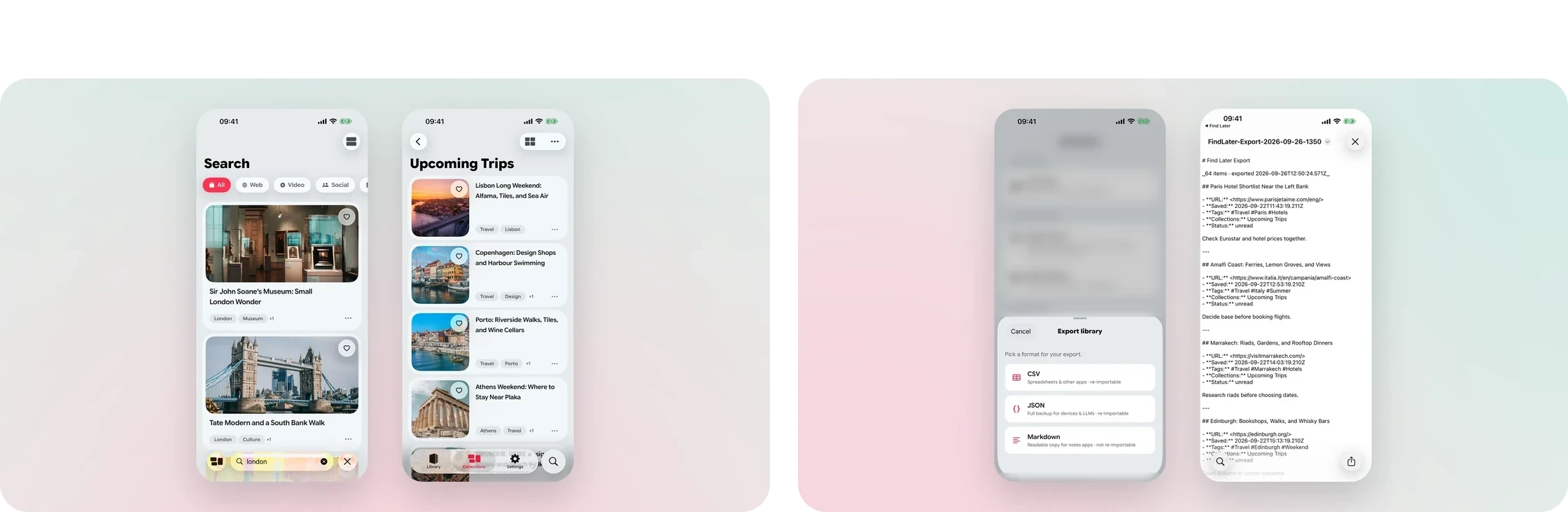
Left Search, and the compact layout for long collections. Right Export as CSV, JSON or Markdown, ready for a notes app.
Preparing it for release
The work expanded beyond the core library into a free tier and Find Later Plus, with a paywall for unlimited saves and collections. I localised the app and its App Store presentation into English, German, Spanish, French and Japanese, designing the store screenshots for each language as part of the release.
I also designed and built the product’s website, getfindlater.com, using the app’s card design to show people what Find Later does before they install it. The app runs on iPad and Mac too, so its layouts had to work across those screens and inputs, not just on iPhone.

Left The website hero. Right The “Simple, on purpose” feature grid.
Refining the routes in and out
Across later revisions, I refined launch speed, collection management, widgets, system search and cover editing. Saving needs to be quick enough to do in the moment, and the same item needs to be easy to recognise when someone returns. The image-led card remains the centre of that experience.
Build
A native library woven into iOS
Find Later is a native iOS app built in SwiftUI, with Core Data and CloudKit syncing each person's library through their own iCloud account. A Share Extension captures from any app; LinkPresentation, Open Graph parsing and dedicated domain handlers assemble previews, with SwiftSoup parsing pages and Nuke loading images. Spotlight, App Intents for Siri and Shortcuts, and widgets bring the library into the rest of iOS, and Image Playground can generate a replacement cover. StoreKit handles Find Later Plus.
Core Data
CloudKit
Share Extension
Spotlight
Siri & Shortcuts
Widgets
Image Playground
LinkPresentation
01
Weak metadata, strong cards
Layered preview sources and editable covers keep the library legible when the web isn't.
02
Copies, not live shares
Shared collections arrive as the recipient's own copy, safe from someone else's later edits.
03
Search in everyday language
Relative-date search understands phrases like "last week" alongside saved content.
Outcome
Released, used and still improving
Find Later is on the App Store: my first released iOS app, updated regularly since release, with new builds tested in TestFlight. The latest update was designed with iOS 27 in mind, making better use of Image Playground. I use it extensively, and so does my family. It gives saved material shape, with the image-led card at its heart, private sync across devices, and clear routes to get everything back out again.
The image-led card
A component I designed in Figma, carried into SwiftUI and still the heart of the product.
Recoverable metadata
Layered previews plus editable titles and covers, including Image Playground.
Ownership built in
Independent-copy sharing, iCloud sync, and CSV, JSON and Markdown export.
Released and localised
On the App Store in English, German, Spanish, French and Japanese.
Status
Live on the App Store · Updates in TestFlight
Live on the App Store · Updates in TestFlight
View on the App Store →
Reflection
Let the content be the interface
In a library, the saved material should be the signpost and the interface should stay in the background. The bright, colour-backed direction had energy, but it competed with the saved images and weakened the quick recognition the product relied on, so I let covers and titles provide the variation instead. The expressive palette found a better home in my other iOS apps, Soleil and Job Search, where colour could support the task without competing with saved content.


